What Is Outspell?
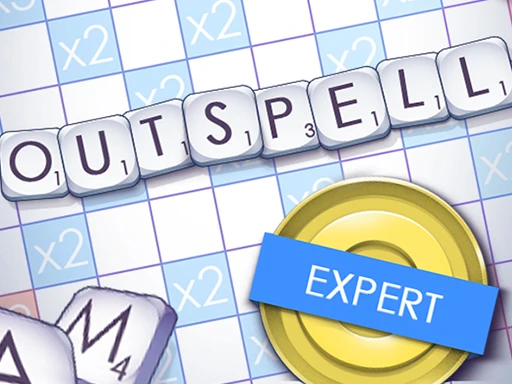
Outspell is an exciting word game developed by a talented team that challenges players to create words using letter tiles on a game board. Released in 2015, this browser-based sports game combines fun and learning, making it perfect for kids and word enthusiasts alike. With engaging gameplay, players can enjoy endless hours of entertainment while improving their vocabulary and spelling skills.
Outspell Gameplay Mechanics
To start playing, select your difficulty level and enter your name. Use your mouse to drag and drop letters onto the game board to form valid English words. The first word must connect to the center square, while subsequent words must link to existing letters on the board, following horizontal or vertical lines.
Pay attention to special bonus squares: blue squares provide letter bonuses, while red squares offer word bonuses. These can significantly boost your score! If you manage to use all your tiles in a single turn, you’ll earn an extra bonus, so aim for longer words or multiple words in one move.
If you’re stuck, you can exchange your letters for new ones, but this will skip your turn. Remember, there are only 88 tiles in the bag, so strategize wisely to maximize your word-building potential!
Play Outspell on Any Device
You can play this game directly in your web browser on desktop, laptop, tablet, or mobile.
How to Play Outspell: A Beginner’s Guide
To start your adventure, simply choose your difficulty level and enter your name. The goal is to create as many words as you can using the letters on the board. Here’s how to play:
- Begin the Game: Select your difficulty level—Easy, Medium, or Hard—and get ready to spell!
- Create Words: Drag and drop your letters onto the board to form valid words. The first word must use the center square, and all following words must connect to existing letters.
- Use Special Squares: Look out for blue squares that give letter bonuses and red squares that offer word bonuses. These can help you score even more points!
- Submit Your Words: Once you’ve formed a word, press “Enter” to submit it. Your word will be checked, and you’ll earn points based on its length and the squares used.
- Keep Playing: Continue forming words until you run out of letters or decide to end the game. Remember, the more words you make, the better!
- Challenge Yourself: Try to spell longer words for higher scores and use all your tiles when possible for extra bonuses!
Mastering Outspell Controls
To excel at this engaging word game, familiarize yourself with the following controls:
- Start the Game: Select your desired difficulty level (Easy, Medium, or Hard) and enter your name to begin.
- Create Words: Drag and drop letters onto the board to form valid English words. The first word must use the center square, and subsequent words must connect to existing letters.
- Submit Your Word: Press the “Enter” key to verify and submit your created word for scoring.
- Score Multipliers: Utilize special bonus squares on the board, such as Double Letter Score and Triple Word Score tiles, to maximize your points.
- Exchanging Letters: If you cannot form a word, you can exchange your letters, which will skip your turn.
- Strategic Placement: Place letters in a single horizontal or vertical line to create multiple words simultaneously for extra points.
- Continue Playing: Keep forming words until you run out of letters or choose to end the game.
Pro Tips to Master Outspell
To become a champion in this exciting word game, follow these expert tips that will help you score big and outsmart your opponents!
- Start Strong: Begin by forming longer words as they earn you more points. Always aim to use the center square to maximize your scoring potential.
- Utilize Bonus Squares: Pay attention to special tiles on the board. Use blue squares for letter bonuses and red squares for word bonuses to significantly boost your score.
- Form Multiple Words: Try to create two or more words in one turn by placing letters next to existing words. This strategy can double your points!
- Look for Common Roots: Familiarize yourself with prefixes and suffixes to expand your vocabulary and discover new word combinations.
- Practice Makes Perfect: Regularly play the game to improve your speed and vocabulary. The more you play, the better you’ll get!
- Strategic Exchanges: If you find yourself stuck, don’t hesitate to exchange your letters. This can help refresh your options for creating new words.
Key Features That Make Outspell Special
Outspell offers a unique blend of fun and challenge, making it a favorite among word game enthusiasts. Here are the standout features that set it apart:
- Engaging Word Search Mechanics: Players can drag and drop letters or type them to create words, enhancing interaction.
- Crossword-Style Gameplay: The game combines elements of crossword puzzles, allowing for strategic word placement.
- Multiple Difficulty Levels: Choose from Easy, Medium, or Hard to match your skill level and keep the game exciting.
- Special Bonus Squares: Utilize blue and red squares for letter and word bonuses to maximize your score.
- Challenging Levels: Each level increases in difficulty, offering new challenges that keep players engaged.
- Leaderboard: Compete with friends or globally to see who can achieve the highest scores.
- Vocabulary Enhancement: The game encourages learning new words, making it educational as well as entertaining.
- Relaxing Gameplay: Enjoy a calming experience while stimulating your mind with word-building challenges.
Play Outspell Online for Free
Experience the thrill of word-building with the browser-adapted version of this popular game. Accessible on Chrome, Firefox, Safari, and Edge, players can enjoy seamless gameplay without the need for downloads. Engage in a variety of online-specific features such as real-time leaderboards and competitive challenges that enhance your gaming experience.
Is Outspell Free to Play?
Yes, you can enjoy this engaging word game completely free of charge! There are no fees or in-app purchases required, allowing players to dive into the fun without any financial commitments. All games on the site are free, providing endless entertainment while enhancing your vocabulary and word-building skills.
Play Outspell Unblocked
Yes, play Outspell Unblocked on helix-jump.com. Whether you’re at school, at work, or on a break—you can play without any restrictions. Enjoy the intellectual stimulation and competitive spirit of this engaging word game, all while enhancing your vocabulary in a relaxed environment. Experience endless fun without the hassle of firewalls or restrictions!
Outspell on GitHub
No need to search on GitHub, our version works on all devices at school or work. Enjoy seamless gameplay without the hassle of downloading or installing software. Experience the thrill of word-building anytime, anywhere!
Download Outspell (PC, iOS, Android)
Many fans enjoy downloading it for an even smoother experience. Here’s how:
- Android: Open the Google Play Store and tap Install.
- iOS: Open the App Store on your iPhone or iPad and tap Get.
- Outspell APK: Android users who can’t use Google Play can find and download the APK from trusted sites to install offline.
- PC Steam: If you like playing on a computer, download the game for free via Steam and enjoy a bigger screen and controller support.
Outspell Extension
The Outspell Chrome extension enhances your gaming experience by allowing instant play directly from your browser. With this extension, you can enjoy seamless access to the game anytime, anywhere, even in offline mode. Download the Chrome extension to elevate your word-building skills and challenge yourself on the go.
FAQs about Outspell
Is Outspell free to play?
Yes, Outspell is 100% free to play. No download or registration is required, so you can start playing right away!
Can I play Outspell at school? (unblocked)
Yes, you can play it at school if the site is unblocked. Many schools allow access to educational games like this one.
Does Outspell work on mobile/phone?
Yes, it works on mobile and phone browsers. You can enjoy playing it on the go without any issues.
Do I need to download Outspell?
No, you do not need to download anything to play. Just visit the game website in your browser and start playing!
Can I play Outspell on Chromebook?
Yes, you can play it on a Chromebook. It runs smoothly in any web browser, making it easy to access.
What are the controls for Outspell?
You can use your mouse or keyboard to play. Click and drag letters or type them directly to form words.
Is there a time limit in Outspell?
Yes, there is a time limit for each round. You need to create as many words as possible before time runs out!
Can I compete with friends in Outspell?
Yes, you can compete against friends by sharing your scores. Try to beat each other’s high scores for fun!
Are there different difficulty levels in Outspell?
Yes, there are different difficulty levels available. You can choose Easy, Medium, or Hard based on your skill level.
Can I save my progress in Outspell?
No, there is no save feature in this game. Each time you play, it starts fresh without saving previous scores.
Is Outspell suitable for all ages?
Yes, it is suitable for players of all ages. The game is designed to be fun and educational for everyone!
Can I use hints in Outspell?
No, there are no hints available during gameplay. It’s all about using your own word skills!
Conclusion
Outspell is a fantastic way for kids to have fun while boosting their vocabulary and critical thinking skills. With its engaging gameplay and friendly competition, players can enjoy countless hours of word-building excitement. The thrill of forming words and aiming for high scores makes every game a new adventure!
We encourage you to try Outspell online today and challenge your friends to join in on the fun. Share the joy of wordplay and see who can come up with the most creative words! Dive into Outspell now and let the games begin!