What Is Cybershark?
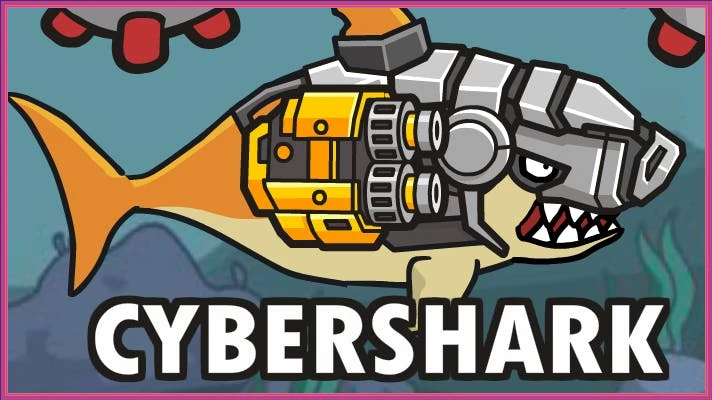
Cybershark is an exciting browser-based sports game developed by Shark Games, released in 2023. Players control a unique cybernetic shark as they dive into thrilling underwater battles against alien invaders. With vibrant graphics and engaging action-packed gameplay, this game offers multiple levels filled with challenges, upgrades, and loot boxes to enhance your shark’s abilities.
Cybershark Gameplay Mechanics
In this exciting underwater adventure, players control a cybernetic shark battling against alien invaders. To navigate and engage in combat, use the following controls:
- 1-5: Activate special skills to unleash powerful attacks.
- Space: Fast forward your movements to dodge enemy attacks.
- WASD / Arrow keys: Move around the battlefield, especially during intense boss fights.
- Left-click: Interact with the in-game user interface for upgrades and loot collection.
The game features vibrant graphics and engaging action-packed gameplay that keeps players on their toes. As you progress through multiple levels, you’ll encounter increasingly challenging alien foes. Collect loot boxes to gather cool items and upgrade your shark’s armor and weapons, enhancing your combat abilities.
To succeed, mastering the controls is essential. Timing your attacks and using the acceleration feature strategically can help you dodge incoming fire while striking back effectively. Always be prepared for tougher enemies by continuously upgrading your gear and practicing your movement skills.
Play Cybershark on Any Device
You can play this game directly in your web browser on desktop, laptop, tablet, or mobile.
How to Play Cybershark: A Beginner’s Guide
Welcome to the exciting world of underwater battles! In this game, you will control a powerful cybernetic shark as you fight against alien invaders. Follow these simple steps to get started on your adventure:
- Explore the ocean and look for enemies to battle.
- Collect coins and loot boxes to gather cool items and upgrades.
- Upgrade your shark’s armor and weapons to become stronger.
- Practice your movements and attacks to prepare for boss fights.
- Enjoy mini-games for extra coins that will help you on your journey!
Mastering Cybershark Controls
In this thrilling underwater adventure, mastering your controls is essential for survival and success. Use the following controls to navigate and engage in battles:
- WASD or Arrow Keys = Move around
- 1-5 = Use skills
- Space = Fast forward
- Left-click = Interact with in-game UI
- / = Move (in battle mode with the boss)
- – = Accelerate
- – = Attack
Pro Tips to Master Cybershark
To become a champion in this underwater adventure, follow these essential tips that will help you dominate the challenges ahead!
- Upgrade Early and Often: Focus on enhancing your armor and weapons as soon as you can. This will ensure you can withstand tougher enemies and deal more damage.
- Master Your Controls: Get comfortable with the movement keys (WASD or arrow keys) and practice using your skills (1-5) effectively during battles.
- Engage in Sea Battle Mini-Games: Regularly play the mini-game to collect extra coins. These coins are vital for purchasing upgrades that will boost your performance.
- Learn Boss Patterns: Pay attention to how bosses attack. Recognizing their patterns will allow you to dodge effectively and strike at the right moments.
- Explore for Loot Boxes: Always keep an eye out for loot boxes while navigating. They contain valuable items that can give you an advantage in battles.
Key Features That Make Cybershark Special
Experience thrilling underwater adventures with unique elements that set it apart from other games. Dive into vibrant graphics and engaging gameplay that keeps you hooked for hours!
- Dynamic underwater combat that immerses players in action.
- Unique cybernetic shark character with customizable upgrades.
- Stunning visuals that bring the ocean to life.
- Challenging levels filled with alien invaders and boss fights.
- Armor upgrades and weapon crafting for enhanced gameplay.
- Exciting loot boxes that offer rare items and bonuses.
- Fun sea battle mini-game to earn extra coins and rewards.
- Free to play directly in your web browser, making it accessible for everyone.
Play Cybershark Online for Free
Experience the thrill of battling alien invaders in this browser-adapted version of the game. Enjoy seamless gameplay directly in your web browser, with no downloads required. Compatible with Chrome, Firefox, Safari, and Edge, you can dive into action anytime, anywhere. Engage in vibrant underwater combat, upgrade your gear, and collect loot boxes—all while enjoying the unique features designed for online play.
Is Cybershark Free to Play?
Yes, you can enjoy this thrilling underwater adventure completely free online! There are no fees or in-app purchases required, allowing players to dive into the action without any financial commitment. All games on the site are free, making it easy to explore the engaging gameplay, upgrade armor and weapons, and participate in exciting battles without spending a dime. The benefits of free play include access to all features and the ability to hone your skills without restrictions, ensuring a fun and immersive gaming experience.
Play Cybershark Unblocked
Yes, play Cybershark Unblocked on helix-jump.com. Whether you’re at school, at work, or on a break—you can play without any restrictions. Enjoy seamless gameplay with no interruptions, and take advantage of the engaging underwater combat and upgrade options that enhance your experience. Dive into action anytime, anywhere!
Cybershark on GitHub
No need to search on GitHub, our version works on all devices at school or work. Enjoy seamless gameplay with engaging underwater battles and unique cybernetic shark characters without the need for downloads or installations. Experience the thrill of action-packed challenges directly in your browser!
Download Cybershark (PC, iOS, Android)
Many fans enjoy downloading Cybershark for an even smoother experience. Here’s how:
- Android: Open the Google Play Store and tap Install.
- iOS: Open the App Store on your iPhone or iPad and tap Get.
- Cybershark APK: Android users who can’t use Google Play can find and download the APK from trusted sites to install offline.
- PC Steam: If you like playing on a computer, download the game for free via Steam and enjoy a bigger screen and controller support.
Cybershark Extension
Enhance your gaming experience with the Chrome extension, designed for instant access to your favorite underwater battles. Enjoy seamless gameplay with quick load times and the ability to play offline, ensuring you can dive into action anytime, anywhere. This extension also provides easy updates and access to exclusive features that improve your overall performance in the game.
FAQs about Cybershark
Is Cybershark free to play?
Yes, Cybershark is 100% free to play. No download or registration is required, so you can jump right into the action!
Can I play Cybershark at school?
Yes, you can play it at school if your school allows unblocked games. It runs directly in your web browser without any downloads.
Does Cybershark work on mobile/phone?
No, Cybershark is designed for browser play on computers. It may not work well on mobile devices.
Do I need to download Cybershark?
No, you do not need to download anything to play. Simply access it through your web browser and start playing!
Can I play Cybershark on Chromebook?
Yes, you can play it on a Chromebook. It works perfectly in the Chrome browser without any extra downloads.
What are the controls in Cybershark?
The controls include using the arrow keys or WASD to move, and numbers 1-5 for skills. You can also use the spacebar to fast forward during battles.
Are there upgrades available in Cybershark?
Yes, players can upgrade their armor and weapons. This helps improve your shark’s abilities and makes battles easier!
Is there a mini-game in Cybershark?
Yes, there is a sea battle mini-game that allows you to earn extra coins. It’s a fun way to collect items and boost your gear!
Can I interact with the game’s UI?
Yes, you can interact with the game’s user interface using the left-click of your mouse. This helps you navigate through menus and options.
How do I win in Cybershark?
You win by upgrading your skills and armor quickly. Mastering controls and timing your attacks will help you defeat bosses effectively!
Conclusion
CyberShark offers an exhilarating underwater adventure that captivates kids with its vibrant graphics and engaging gameplay. As you battle alien invaders, you’ll experience the thrill of upgrading your shark and mastering exciting combat skills. Every level brings new challenges, ensuring endless fun!
Don’t miss out on the action—dive into CyberShark today and unleash your inner hero! Invite your friends to join the fight, and see who can conquer the toughest enemies together. Play now and make a splash in this exciting underwater world!