What Is Yummy Taco?
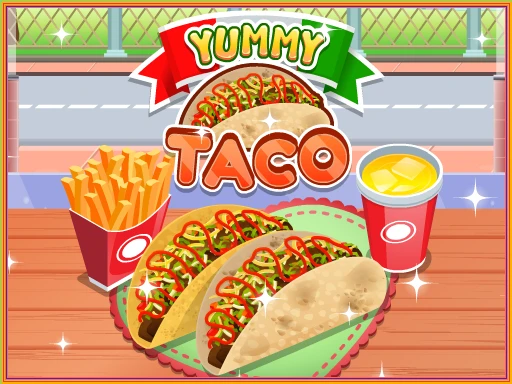
Yummy Taco is an exciting cooking simulation game where players get to create delicious virtual tacos! Developed by Go Panda Games and released on Poki, this fun browser-based experience allows kids to explore their culinary skills while managing a busy taco stand. With easy controls and colorful graphics, it’s perfect for young chefs looking to have a blast in the kitchen!
Yummy Taco Gameplay Mechanics
In this fun cooking simulation, players will dive into the exciting world of taco-making! To start, simply click or tap on the ingredients displayed in the kitchen. Use your mouse or touchscreen to drag and drop each ingredient onto the tortilla on the right side of the screen. Once you’ve created a delicious taco with the correct ingredients, click on it to finish and serve it to your customer.
Pay close attention to your customers’ patience levels, indicated by their shaking; if they get too impatient, they may leave without paying! To maximize your earnings, serve tacos quickly and accurately. If you make a mistake, simply drag the incorrect taco to the trash can and start over. Remember, you can also serve drinks by selecting them and delivering them in the same way as tacos.
Keep an eye on the timer at the top left of the screen, as it counts down your time to serve all customers. The faster you serve, the more cash you’ll earn! New customers will only appear once you’ve collected payments from previous ones, so strategize your order of operations for optimal success!
Play Yummy Taco on Any Device
You can play this game directly in your web browser on desktop, laptop, tablet, or mobile.
How to Play Yummy Taco: A Beginner’s Guide
Welcome to the fun world of taco-making! In this game, your mission is to create delicious tacos for your customers. Follow these easy steps to get started:
- Click the play button on the welcome screen to begin your taco adventure!
- Select an ingredient from the kitchen. You can choose from tasty items like meat, cheese, and veggies.
- Drag and drop the ingredients onto the tortilla on the right side of the screen.
- Once your taco is ready, click on it to finish it up!
- Deliver the taco to your waiting customer by dragging it over to them.
- If a customer orders a drink, repeat the same process: select and serve it quickly!
- Collect payment by clicking on the money left by the customer after they enjoy their meal.
Remember, serving customers quickly is key to earning more cash and keeping them happy! Enjoy making tasty tacos!
Mastering Yummy Taco Controls
To enjoy your cooking adventure, familiarize yourself with the controls:
- Mouse Controls: Use the left mouse button to select ingredients and interact with the game.
- Touchscreen Controls: Tap on the screen to pick up objects and follow on-screen arrows to complete actions.
- Ingredient Selection: Click or tap an ingredient, then drag and drop it onto the tortilla on the right side of the screen.
- Serving Tacos: After assembling the taco, click or tap on it to serve it to the customer.
- Collecting Payment: Click or tap on the payment left by customers to collect your earnings.
For advanced gameplay, consider delaying payment collection until all orders are served to maximize efficiency. If mistakes happen, drag and drop incorrect tacos to the trash can to start over.
Pro Tips to Master Yummy Taco
Ready to become a taco-making superstar? Follow these expert tips to serve your customers quickly and keep them happy!
- Always check the customer’s order carefully! Make sure to include only the ingredients they asked for, as mistakes can lead to unhappy customers.
- Pay attention to the patience meter! If customers start shaking, it means they’re getting impatient. Serve them as fast as you can!
- When a customer orders both a taco and a drink, serve the drink first. It helps keep them satisfied while you prepare their taco.
- Collect payments after serving all customers on the screen. This strategy allows you to focus on making tacos without interruptions.
- If you make a mistake, don’t panic! Simply drag the incorrect taco to the trash can and start over. Quick corrections are key!
- Keep an eye on the timer bar at the top left corner. Plan your moves wisely to ensure you serve everyone before time runs out!
Key Features That Make Yummy Taco Special
Experience the joy of cooking with this fun and engaging game! Here are some exciting features that make it a must-play:
- Interactive Gameplay: Players click or tap to select ingredients and create delicious tacos, enhancing hand-eye coordination.
- Time Management: Serve customers quickly to earn more points and keep them happy, adding a thrilling challenge.
- Customizable Orders: Each customer has unique preferences, allowing for creativity in taco preparation.
- Educational Elements: Improve your multitasking skills and learn about food preparation in a fun environment.
- Accessible on Multiple Devices: Play on both mobile devices and desktops, making it easy to enjoy anywhere.
- Colorful Graphics: Bright and charming visuals create an inviting atmosphere for players of all ages.
Play Yummy Taco Online for Free
Experience the fun of this browser-adapted version, allowing you to prepare delicious virtual tacos right from your favorite web browser. Whether you’re using Chrome, Firefox, Safari, or Edge, you can jump into the action without any downloads. Enjoy features like quick customer interactions and a vibrant kitchen setup that enhance your cooking experience online!
Is Yummy Taco Free to Play?
Yes, you can enjoy this delightful cooking game completely free online. There are no fees or in-app purchases required, allowing players to dive right into the fun without any financial commitment. All games on the site are free, providing a fantastic opportunity to sharpen your cooking skills while experiencing the thrill of managing a virtual taco stand.
Play Yummy Taco Unblocked
Yes, play Yummy Taco Unblocked on helix-jump.com. Whether you’re at school, at work, or on a break—you can play without any restrictions. Enjoy the fun of preparing delicious tacos while honing your time management skills in this engaging simulation. Experience the thrill of serving customers quickly and accurately, all while enjoying the convenience of an unblocked version!
Yummy Taco on GitHub
No need to search on GitHub, our version works on all devices at school or work. Enjoy seamless gameplay without any downloads or installations, making it perfect for quick play sessions. Dive into the fun and create delicious tacos right from your browser!
Download Yummy Taco (PC, iOS, Android)
Many fans enjoy downloading it for an even smoother experience. Here’s how:
- Android: Open the Google Play Store and tap Install.
- iOS: Open the App Store on your iPhone or iPad and tap Get.
- APK: Android users who can’t use Google Play can find and download the APK from trusted sites to install offline.
- PC Steam: If you like playing on a computer, download the game for free via Steam and enjoy a bigger screen and controller support.
Yummy Taco Extension
Enhance your gaming experience with the Chrome extension designed for instant play of this delightful cooking game. The extension allows you to access your favorite taco-making adventure directly from your browser, making it easier than ever to jump into the fun. With offline mode capabilities, you can enjoy cooking tacos anytime, anywhere, without needing an internet connection. Ready to spice up your gameplay? Download the Chrome extension now!
FAQs about Yummy Taco
Is Yummy Taco free to play?
Yes, it is 100% free to play. You can enjoy the game without any downloads or registrations.
Can I play Yummy Taco at school?
Yes, you can play it at school if it’s unblocked. Many schools allow access to fun educational games like this one.
Does Yummy Taco work on mobile/phone?
Yes, it works perfectly on mobile devices. You can play on your phone or tablet anytime!
Do I need to download Yummy Taco?
No, you do not need to download it. Just open your browser and start playing right away!
Can I play Yummy Taco on Chromebook?
Yes, it is compatible with Chromebooks. You can easily access it through your web browser.
How do I play Yummy Taco?
You simply click or tap to pick up ingredients and follow the game instructions. Drag and drop items to create delicious tacos!
Who created Yummy Taco?
Yummy Taco was developed by Go Panda Games. They are known for creating fun and engaging games for kids!
How can I play Yummy Taco for free?
You can play it for free on platforms like Poki. Just visit the site and start having fun!
What are the controls for Yummy Taco?
You use your mouse or touchscreen to interact with the game. It’s super easy and kid-friendly!
Can I serve drinks in Yummy Taco?
Yes, you can serve drinks alongside tacos. Just select a drink and drag it to the customer like you do with tacos!
Is there a time limit in Yummy Taco?
Yes, there is a time limit for serving customers. You need to be quick to keep them happy!
What happens if I make a mistake in Yummy Taco?
If you make a mistake, you can drag the taco to the trash can and start over. It’s all part of the fun!
Conclusion
Yummy Taco is a fun and engaging cooking simulation that lets kids unleash their creativity in the kitchen! With simple controls and colorful graphics, players can enjoy crafting delicious tacos while honing their time management skills.
Gather your friends and challenge them to see who can serve the tastiest tacos the fastest. Don’t miss out on the fun—play Yummy Taco online today and share your culinary creations with others!