What Is My Shark Show?
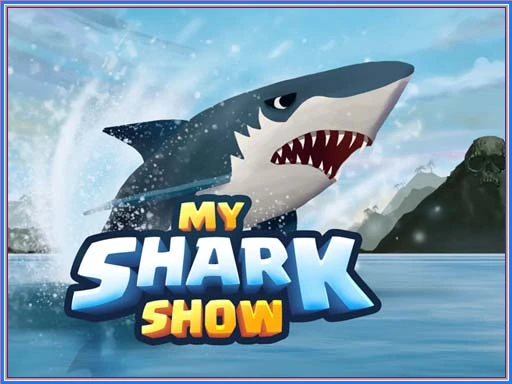
My Shark Show is an exciting browser-based sports game developed by Oceanic Games, released in 2023. Dive into a thrilling underwater adventure where you control a hungry shark, navigating through vibrant environments and completing fun missions.
Players can jump through burning hoops, collect fish, and eat other sea creatures to earn points and unlock new shark skins. With engaging graphics and physics-based mechanics, it’s designed for endless fun without needing any installation—just play on your mobile or desktop!
My Shark Show Gameplay Mechanics
In this exciting underwater adventure, players control a shark using simple keyboard or touch controls. Navigate through vibrant ocean environments with the arrow keys or your finger on mobile devices. Jump out of the water by pressing the spacebar to perform thrilling stunts, smash through obstacles, and collect delicious fish and meat to grow stronger.
As you explore, you’ll encounter various missions that challenge you to eat other fish, jump through burning hoops, and dodge surfers. Each successful mission rewards you with coins that can be exchanged for new shark skins or special abilities. Players can choose from multiple shark types, each with unique characteristics, enhancing the gameplay experience.
The game features an engaging ocean simulator where you can unleash chaos and destruction while avoiding larger predators. Remember to practice your jumps and timing to maximize your score and ensure survival in this competitive aquatic world!
Play My Shark Show on Any Device
You can play this game directly in your web browser on desktop, laptop, tablet, or mobile.
How to Play My Shark Show: A Beginner’s Guide
Welcome to the exciting underwater world! In this game, you will control a hungry shark, exploring vibrant oceans while munching on fish and completing fun challenges. Your goal is to grow stronger and set high scores!
- Use your finger on mobile devices or the mouse and keyboard on desktops to guide your shark.
- Swim around to find and eat fish and meat to fill your belly.
- Jump through hoops and perform stunts by tapping the jump button or pressing the spacebar.
- Avoid larger predators while hunting smaller creatures for points.
- Complete missions to earn rewards and unlock new shark skins.
Mastering My Shark Show Controls
To navigate through the thrilling underwater world, you can use a variety of controls depending on your device:
- Desktop Controls:
- Move your shark using the W, A, S, D keys or the Arrow Keys.
- Press the Spacebar to jump out of the water and perform stunts.
- Use the Spacebar again to attack and consume prey.
- Mobile Controls:
- Simply swipe your finger on the screen to control your shark’s movements.
This game allows you to play immediately without installation on mobile phones, tablets, or desktop devices. Master these controls to dominate the ocean and complete exciting missions!
Pro Tips to Master My Shark Show
Become a pro in the underwater world with these essential tips! Follow these strategies to enhance your gameplay and achieve the highest scores.
- Master Your Jumps: Timing is everything! Practice your jumps to not only collect meat but also to perform stunts that earn you bonus points.
- Prioritize Smaller Prey: Start by hunting smaller fish to build your strength. This will help you take on larger predators later in the game.
- Explore for Power-ups: Keep an eye out for hidden power-ups in each level. These can boost your abilities and give you an edge in battles.
- Avoid Larger Predators: Use your agility to evade bigger sharks while you gather resources. Stay stealthy and plan your attacks wisely!
- Complete Missions: Focus on completing missions for extra rewards. Each mission completed can unlock new skins and enhance your gameplay experience.
- Collect Coins: Make sure to gather coins throughout the game. You can exchange them for exciting new shark skins or other sea creatures!
Key Features That Make My Shark Show Special
Experience the thrill of the ocean with unique features that set this game apart! Dive into exciting missions, collect rewards, and enjoy stunning graphics!
- Multiple shark types: Choose from a variety of sharks, each with unique abilities.
- Exciting missions: Complete fun challenges to earn rewards and unlock new content.
- Dynamic environments: Explore diverse underwater worlds, from vibrant coral reefs to icy waters.
- Jump through hoops: Perform spectacular stunts to impress your friends and score big points!
- Collectible coins: Gather coins in every level to exchange for new shark skins or other sea creatures.
- Play offline: Enjoy the game anytime, anywhere, without needing an internet connection.
Play My Shark Show Online for Free
Dive into the thrilling browser-based version of this exciting game! Adapted for seamless play, you can enjoy the underwater adventures on popular browsers like Chrome, Firefox, Safari, and Edge. Experience unique online features such as instant access without installation, engaging graphics, and the ability to compete for high scores with players worldwide.
Is My Shark Show Free to Play?
Yes, you can enjoy this thrilling underwater adventure completely free online! There are no fees or in-app purchases required, allowing you to dive into the action without any financial commitment. All games on our site are free, providing you with the opportunity to explore exciting gameplay features like jumping through hoops and battling fierce creatures without any limitations. Experience the benefits of free play, such as honing your skills and setting high scores, all while having fun!
Play My Shark Show Unblocked
Yes, play My Shark Show Unblocked on helix-jump.com. Whether you’re at school, at work, or on a break—you can play without any restrictions. Enjoy the thrill of jumping through hoops and battling other creatures while collecting coins to unlock new skins. Plus, it’s browser-based, so no downloads are needed!
My Shark Show on GitHub
No need to search on GitHub, our version works on all devices at school or work. Enjoy seamless gameplay without installation, and dive into the underwater world instantly. Experience exciting missions and collect rewards in this browser-based sports game!
Download My Shark Show (PC, iOS, Android)
Many fans enjoy downloading My Shark Show for an even smoother experience. Here’s how:
- Android: Open the Google Play Store and tap Install.
- iOS: Open the App Store on your iPhone or iPad and tap Get.
- My Shark Show APK: Android users who can’t use Google Play can find and download the APK from trusted sites to install offline.
- PC Steam: If you like playing on a computer, download the game for free via Steam and enjoy a bigger screen and controller support.
My Shark Show Extension
Enhance your gaming experience with the Chrome extension for instant play! This browser extension allows you to dive into the underwater world without any installation hassle, making it easy to start playing right away. Enjoy offline modes and seamless access to your favorite features, so you can enjoy every thrilling moment of the game anytime, anywhere!
FAQs about My Shark Show
Is My Shark Show free to play?
Yes, My Shark Show is 100% free to play. No download or registration is required, so you can dive right in!
Can I play My Shark Show at school?
Yes, you can play it at school as long as the website is unblocked. It’s a fun way to enjoy some gaming during breaks!
Does My Shark Show work on mobile/phone?
Yes, it works perfectly on mobile and phone devices. You can easily control your shark using your finger!
Do I need to download My Shark Show?
No, you do not need to download anything to play. Just access it through your browser and start having fun!
Can I play My Shark Show on Chromebook?
Yes, you can play it on a Chromebook. It runs smoothly in your web browser without any issues.
What are the controls for My Shark Show?
You can use the arrow keys or “W,A,S,D” to navigate your shark. Press the spacebar to jump and perform stunts!
Can I play offline?
No, you need an internet connection to play My Shark Show. However, it’s easy to jump back in whenever you’re online!
Are there different shark types available?
Yes, there are multiple shark types you can choose from. Each one offers a unique experience as you explore the underwater world!
What should I focus on to win?
You should focus on completing missions and eating smaller creatures first. This will help you grow stronger and earn more rewards!
Is there a way to earn extra coins?
Yes, watching ads can help you gain extra coins for new skins or boosts. It’s a great way to enhance your gameplay!
Can I collect items while playing?
Yes, you can collect fish and meat to satisfy your hunger and grow stronger throughout the game. Keep an eye out for rewards!
Conclusion
My Shark Show is an exhilarating underwater adventure that lets kids unleash their inner predator! With exciting missions, various shark types, and the thrill of hunting, it’s a game that keeps players engaged and entertained.
Encourage your friends to join the fun and see who can achieve the highest scores! Dive into the action and experience the excitement of being the ultimate shark. Play now for free on our site!