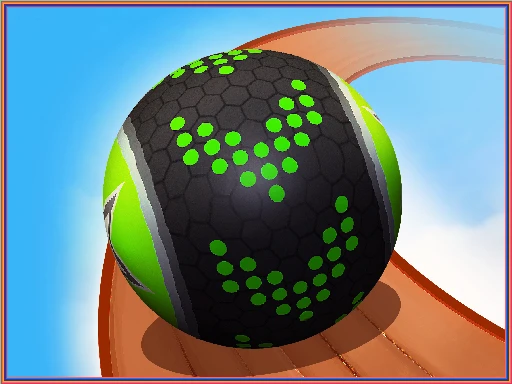
What Is Jump And Hover?
Jump And Hover is an exciting puzzle platform game developed by Robert Alvarez, released in December 2021. This engaging game features unique physics-based mechanics that allow players to jump and hover through challenging obstacle courses. With a rating of 9.0 from over 3,460 votes, it’s available on multiple platforms including desktop, mobile, and tablet via HTML5 technology.
Jump And Hover Gameplay Mechanics
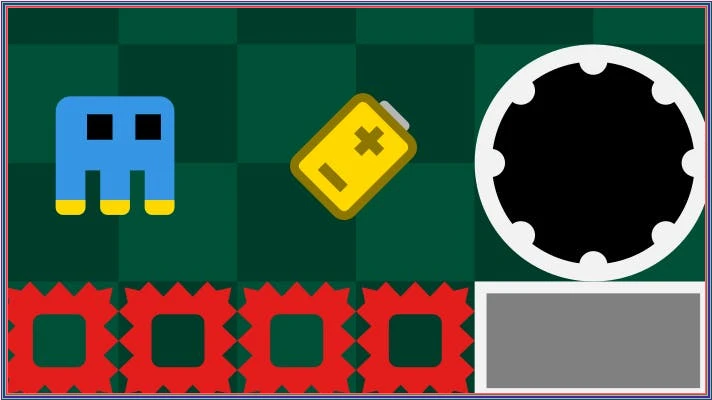
In this exciting browser-based platformer, players control a cube character using simple keyboard inputs. Move left or right with the A/D keys or arrow keys, and press the spacebar or W key to jump. Hold the jump key while in the air to activate your hover ability, allowing you to glide over obstacles and reach higher platforms.
The game features physics-based mechanics that make every jump feel realistic, enhancing the challenge as you navigate through engaging levels filled with tricky obstacles. To keep your hover ability active, look for scattered batteries throughout the levels; landing on solid ground will also recharge your hover energy. Timing is crucial—mastering jumps and hovers will help you conquer each level’s unique puzzles.
As you progress, you’ll encounter increasingly difficult challenges that require strategic thinking and precise movements. Keep an eye on your energy levels and plan your moves carefully to avoid falling into traps. Get ready for a thrilling adventure with Jump And Hover!
Play Jump And Hover on Any Device
You can play this game directly in your web browser on desktop, laptop, tablet, or mobile.
How to Play Jump And Hover: A Beginner’s Guide
Welcome to the exciting world of this fun game! Your goal is to navigate through challenging levels while using your jumping and hovering skills. Follow these simple steps to get started:
- Use the arrow keys or A and D to move your character left and right.
- Press the spacebar or W to jump into the air.
- Hold the spacebar or W while in the air to hover and glide over obstacles.
- If you need to restart a level, press R.
- To go back, use the Esc key or B.
Mastering Jump And Hover Controls
To navigate through the game effectively, familiarize yourself with the following controls:
- Move: A or D keys or Left and Right arrow keys
- Jump: W key, Up arrow key, or Spacebar
- Hover: Hold W key, Up arrow key, or Spacebar while in the air
- Reset: R key
- Back: Esc key or B key
Pro Tips to Master Jump And Hover
To become a pro in this exciting game, focus on these specific strategies that will elevate your gameplay and help you conquer challenging levels!
- Timing is Key: Perfect your jump timing to maximize your hover duration. The longer you hover, the easier it is to navigate tricky obstacles!
- Collect Batteries: Always be on the lookout for scattered batteries. These will recharge your hover ability, allowing you to stay airborne longer and tackle difficult sections.
- Plan Your Moves: Before jumping, observe the patterns of obstacles ahead. This foresight will help you make strategic decisions and avoid unnecessary falls.
- Practice Makes Perfect: Don’t hesitate to replay levels. Familiarizing yourself with each course will improve your skills and boost your confidence.
- Use Hover Wisely: Remember, holding down the jump key activates hover. Use this feature strategically to glide over gaps and dodge hazards!
Key Features That Make Jump And Hover Special
This game offers a variety of exciting elements that enhance the gameplay experience. Here are the standout features:
- Puzzle platform mechanics that challenge your problem-solving skills.
- Unique hovering ability that allows for creative navigation through obstacles.
- Rechargeable hover energy, which can be replenished by landing or collecting batteries scattered throughout the levels.
- Engaging levels with increasing difficulty that keep players on their toes.
- Physics-based mechanics that create realistic movements and interactions in the game world.
- Challenging obstacle courses designed to test your timing and precision.
- Strategic gameplay elements that require careful planning to succeed.
Play Jump And Hover Online for Free
Experience the thrill of this browser-adapted version, designed for seamless play across various platforms. Enjoy Jump And Hover on popular browsers like Chrome, Firefox, Safari, and Edge. This online version features engaging levels and physics-based mechanics that challenge your skills while allowing you to recharge your hover ability by collecting batteries scattered throughout the game.
Is Jump And Hover Free to Play?
Yes, you can enjoy this exciting game completely free online! There are no fees or in-app purchases required, allowing players to dive into the action without any financial commitment. All games on this site are free, providing a great opportunity to experience engaging gameplay, challenging levels, and the thrill of mastering physics-based mechanics without spending a dime.
Play Jump And Hover Unblocked
Yes, play Jump And Hover Unblocked on helix-jump.com. Whether you’re at school, at work, or on a break—you can play without any restrictions. Enjoy seamless access to all levels and features, including the engaging puzzle mechanics and rechargeable hover ability. Experience the thrill of challenging obstacle courses anytime, anywhere!
Jump And Hover on GitHub
No need to search on GitHub, our version works on all devices at school or work. The game features engaging puzzle platform mechanics, rechargeable hover abilities, and challenging obstacle courses that will keep you entertained. Enjoy seamless gameplay without the hassle of downloading from GitHub!
Download Jump And Hover (PC, iOS, Android)
Many fans enjoy downloading Jump And Hover for an even smoother experience. Here’s how:
- Android: Open the Google Play Store and tap Install.
- iOS: Open the App Store on your iPhone or iPad and tap Get.
- Jump And Hover APK: Android users who can’t use Google Play can find and download the APK from trusted sites to install offline.
- PC Steam: If you like playing on a computer, download the game for free via Steam and enjoy a bigger screen and controller support.
Jump And Hover Extension
Enhance your gaming experience with the Jump And Hover Chrome extension! This tool allows for instant play directly from your browser, eliminating the need for downloads or installations. Enjoy the possibility of offline modes, enabling you to continue your adventure even without an internet connection. Get the extension now at this Chrome extension link!
FAQs about Jump And Hover
Is Jump And Hover free to play?
Yes, Jump And Hover is 100% free to play. You can enjoy it without any downloads or registration!
Can I play Jump And Hover at school? (unblocked)
Yes, you can play it at school if your school allows access to gaming websites. It’s a fun way to take a break during your day!
Does Jump And Hover work on mobile/phone?
Yes, it works on mobile devices! You can play it on your phone or tablet using a web browser.
Do I need to download Jump And Hover?
No, you do not need to download anything. Just open your browser and start playing right away!
Can I play Jump And Hover on Chromebook?
Yes, you can play it on a Chromebook. It runs smoothly in the browser without any issues.
What are the controls for Jump And Hover?
The controls are simple: use A/D or the left/right arrow keys to move, W or the up arrow to jump, and hold W or the up arrow to hover.
Are there levels in Jump And Hover?
Yes, there are multiple levels with increasing difficulty. Each level presents new challenges for you to overcome!
Can I play Jump And Hover with friends?
No, this game is designed for single-player fun. You can challenge yourself to beat your own scores!
Is there a time limit in Jump And Hover?
No, there is no time limit. You can take your time to solve puzzles and complete each level at your own pace.
How do I recharge my hover ability?
You can recharge your hover ability by landing safely or collecting batteries scattered throughout the levels.
Is there a way to reset my game progress?
Yes, you can reset your game progress by pressing the ‘R’ key at any time during gameplay.
Can I play Jump And Hover offline?
No, you need an internet connection to play it since it’s a browser-based game.
Conclusion
Jump and Hover is an exciting adventure that combines puzzle-solving with platforming fun, perfect for kids of all ages! With its unique hover mechanics and challenging levels, players will find themselves engaged and eager to improve their skills.
Why not give it a try? Jump into the action and see how far you can go! Don’t forget to share the fun with your friends and challenge them to beat your scores!